Auditor Agent in a TEE — Operator View
Dashboard for plans submitted to the TEE. View plan contents, track signing and data-submission state, execute approved plans stage by stage, and inspect results.
Your Plans
root and can see every plan on this TEE, including plans you are not a party to. This view is intended for operators and demos only — it would not exist in production. You cannot sign or upload data as root.
iAbout the shared "Your Plans" view
Your Plans is the list of audit plans where you are one of the two signing parties. Each plan in this list is shared between you and your counterparty — you both see the same plan, the same signing/upload state, and the same execution results, but neither side ever sees the other's private uploaded data.
Plans you are not a party to are hidden here. They are still recorded inside the TEE — they're just not yours to act on.
About this project
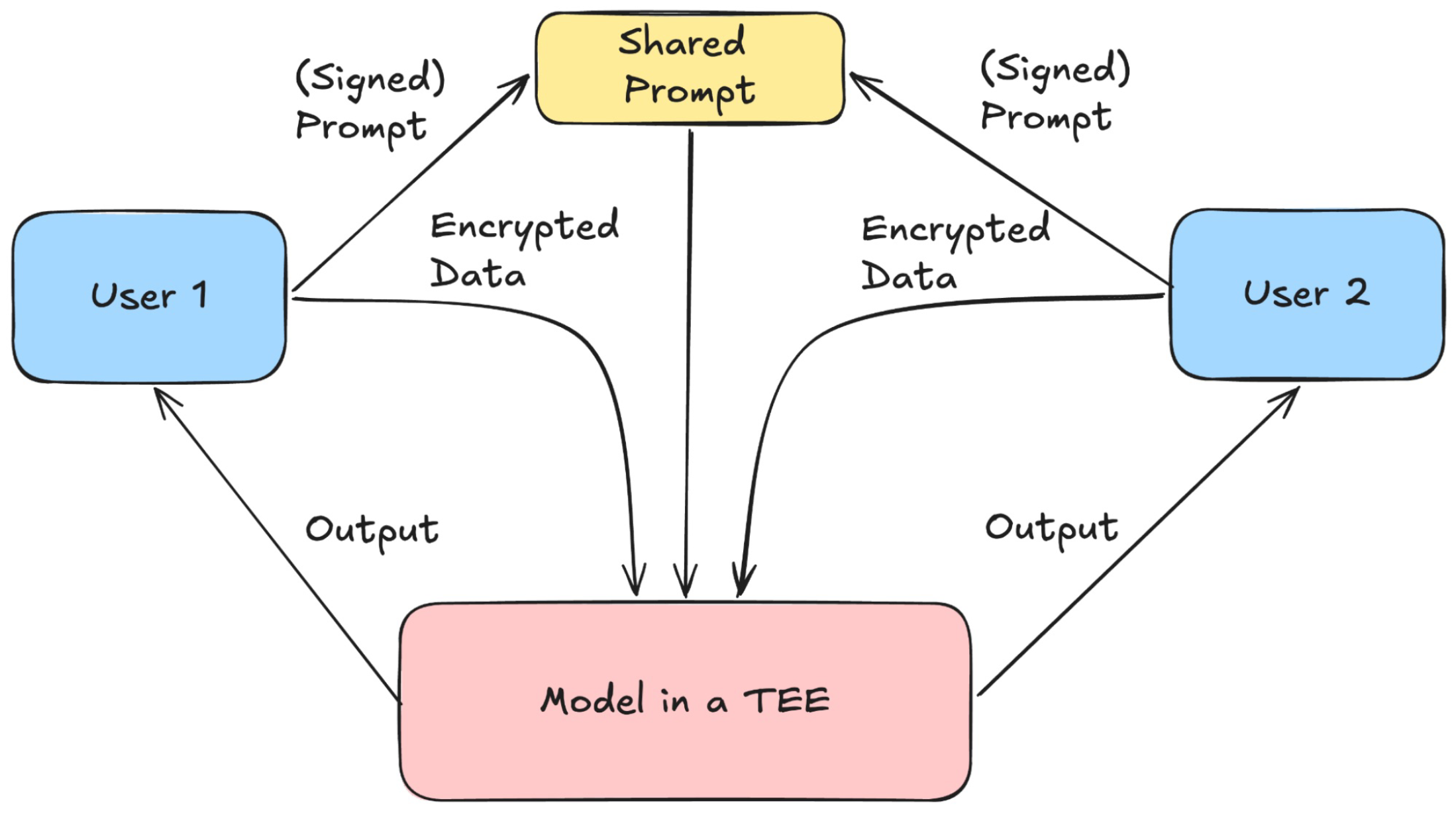
Auditor-in-a-TEE is an agent that runs inside a Trusted Execution Environment so two parties can run a jointly-agreed computation over their private data without either party (or the TEE operator) seeing the other's input. Each party signs an audit plan — a structured pipeline of input filters, query steps, and output filters — and uploads their data through an authenticated session. The TEE executes the signed plan stage by stage and returns only the final output, with every step recorded on a public ledger so anyone can verify what ran. This dashboard is one interface to the TEE; the same endpoints are also driven by the auditor CLI below.
Walkthrough Video
CLI Quickstart
Plans are normally authored and submitted from the command line. The webapp is a view on top of the same REST endpoints — everything below can also be done with curl against /plan, /sign, /data, /run-stage, etc.
pip install -e path/to/auditor-in-a-TEE/cli
export AUDITOR_TEE_URL=https://your-auditor.tinfoil.dev
auditor keygen --out ~/.auditor/keys/alice.json
auditor keygen --out ~/.auditor/keys/openbrain.json
auditor plan template openbrain_audit --out my_plan.yaml
# edit my_plan.yaml:
#   - replace user1_public_key / user2_public_key with the two pubkeys
#   - tune stages / titles / prompts / constitutions as needed
auditor plan create my_plan.yaml
auditor plan show   # verify it landed
auditor plan sign  --user user1 --key ~/.auditor/keys/alice.json
auditor data submit --user user1 --key ~/.auditor/keys/alice.json --data alice.json

auditor plan sign  --user user2 --key ~/.auditor/keys/openbrain.json
auditor data submit --user user2 --key ~/.auditor/keys/openbrain.json --data openbrain.json
auditor run        # or click Run All / per-stage buttons in the webapp
auditor results    # prints the final output once the output filter passes
Add --json to any command to script around the output. All endpoints live under the TEE Server URL configured above — the webapp and the CLI talk to the same server, so you can mix the two freely.
Plan Status
(Plan ID: )
| User 1 Signed | -- |
| User 2 Signed | -- |
| User 1 Data Submitted | -- |
| User 2 Data Submitted | -- |
Appeal Rejected Query
The new query will re-run the input stage. If it also fails, the ledger records an appeal_rejected entry.
If it passes, an LLM produces a short diff summary (5–12 words) that's written to the public ledger — the query text itself never leaves the TEE.
Plan Contents
Click a user's pill to see their data format, or any step node to see its prompt / code.
iWhat is run_llm?
Prompt a LLM running in a TEE. Each run_llm step pins a specific model (e.g. gemma4-31b), a constitution the model must follow, and a prompt template with placeholders like {data1}, {data2}, or {step_N_output} that get embedded at run time.
Common uses: constitutional classifiers that emit a single VALID / INVALID verdict, classification of user messages against a fixed label set, etc.
iWhat is run_python?
A pre-agreed Python snippet that runs inside the TEE. Both parties sign the exact source as part of the plan, so there's no surprise about what the code does.
The snippet has access to the outputs of earlier steps as step_N_output. Common uses: regex over the output of an earlier run_llm step (e.g. PII checks), schema validation, deterministic math like k-anonymity suppression, etc.
Public Ledger
Append-only event log, visible to both parties. Records plan creation, signatures, data submission, stage pass/fail verdicts, and appeals. Raw queries and data never appear here — only their outcomes and any diff summaries from accepted appeals.
Your Uploaded Data
Results
Plan Builder
Author a new audit plan and submit it to the TEE. Each step must belong to exactly one stage (input / query / output). Use the assistant on the right to draft plans conversationally.